



RSS Feeds: Boosting Marketing Visibility
RSS feeds can be a very useful tool, but are they applicable for marketing and promotion? Let’s see how they stack up when companies try to leverage them as a tool. So, how do you create an RSS feed that supports your marketing efforts? That will, like any other promotional activity, require the usual legwork, so let’s break it down.
RSS Feeds: Meaning & Applications
RSS feed stands for Really Simple Syndication feed. This is a feed that uses RSS files placed on websites or lists to create a “feed” of content. For example, Google and other platforms use RSS to list podcasts, helping them find and categorise the content, its metadata, and description. App or website users can create custom feeds tailored to their interests, often using programs like Feedly.
Similar to schema, when you create RSS feed lists, you allow outside sources to categorise them easily. This can help propel and boost your content to different audiences.
While this format is really popular for podcasts and news articles, it can be a good promotional tool as well. An RSS feed newsletter can be a fantastic way to keep your customers informed about your business’s ongoing progress or news.
Many platforms automatically pick up RSS feeds. For written content, these include:
- Feedly
- Newsblur
- Feedreader
For platforms like Feedly, you can ask your target audience to add you there.
For podcasts, the usual platforms like Spotify and Podcast Addict can pick them up when you follow these steps:
- Sign up on the desired podcast hosting platform
- Publish your podcast content
- Get an RSS feed URL
- Submit the RSS feed URL to Spotify or other platform (assuming it works similarly)
- Wait for the platform to review it
After that, it should be online.
How to Create an RSS Feed

To make an RSS feed, you can use several different websites or CMSs. On WordPress, you can add an “/feed/” slug to the end of your website’s domain name. As an example, we could do it with: “https://promoguy.nl/blog/feed/”. These RSS feed formats and codes may vary for different CMS programs, so ensure you match the code to the one you are using to build rss feeds and publish content.
There are also other ways which can be more laborious but have customisation benefits. RSS feeds created using XML code require connecting nodes. Create a primary node with channel and title of the feed, links back to the website, a description of the feed itself, and the language you are writing in. You can include images or logos in the XML code if you want to.
The downside to this is that you will need to add a new item to the top of the list each time you update it. This should include the title of the item, publishing dates, links to the webpage, and a CDATA description.
In theory, you can create an RSS feed from any website, but it takes a bit of know-how.
Promoting Your RSS Feeds
Here are a few ways to promote your feed:
- RSS Auto Discovery: Add RSS ‘Auto-Discovery’ tags in your web page headers. Feed readers often have auto-detect functions, but to detect your feed, you need these tags.
- Add a feed Icon: An RSS icon should be both visible and clear. Many websites add it to the sidebar or footer. This will automatically add your pages to their feed.
- Submit to RSS feed directories: Another crucial step is to create an RSS feed from other websites to your desired audience and promote it on the major platforms that can pick it up.
- Tell your customers: Remind readers to add you on Spotify or other platforms within the content as well. You can submit the RSS feed to various RSS feed directories and RSS search engines. If you have an email subscription list, inform your subscribers that this is also an option.
Types of RSS Feeds & Content
- Blogs: These feeds can easily keep customers engaged. These are particularly great for news delivery and cutting through the noise, especially in industries where social media can be crowded. Websites that use RSS feeds can automate their content discovery and make promotion easier, especially on platforms where there is high engagement for writing.
- Podcasts: Podcast RSS feeds make uploading far easier, and allow for platforms like Spotify to easily review them.
- Social media: Aside from blogs and podcasts, there are other ways to use RSS feeds. Social media sites can be turned into feeds as well. For example, you can create an RSS feed of Twitter or a Reddit RSS feed by using programs like RSS.app. This can make the reading experience much.
- Google alerts RSS feed: You can edit your Google alerts to redirect straight to your RSS platforms through the edit options. This can be a great custom news stream.
- YouTube: A YouTube feed RSS can also be very handy for more visual podcasts. The RSS app can also help with this, allowing for a curated feed of videos.
Popular RSS feeds tend to be news, comedy podcasts, true crime, and the usual content that does well.
Formatting Your Feed
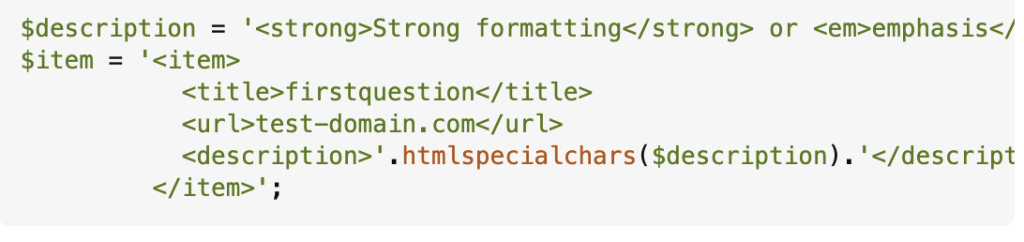
RSS feed SEO is similar to standard SEO in that it requires metadata, descriptions, and a title. The html for RSS feeds should look something like this:
$description = '<strong>Strong formatting</strong> or <em>emphasis</em>.';

$item = '<item>

<title>firstquestion</title>

<url>test-domain.com</url>

<description>'.htmlspecialchars($description).'</description>

</item>';
You can add the description in the “htmlspecialchars” and description spot.