


Google AI Overview: Using the Overview & How to Switch it Off
With the addition of the Google AI overview, the SEO game has changed quite a bit. It has replaced the old featured snippet system with an LLM summary. So let’s go over how to optimise content for Google AI overviews and the best tools to track your progress. We’ll also discuss how to turn off AI overview on Google, because it can be crucial for certain marketing procedures.
First, let’s go over how to create content that matches the needs of an AI overview and optimises readability for LLMs.
How to Rank in AI Overviews
Best practices for Google’s AI overview work similarly to LLM search optimisation, albeit with a few more specific actions you can take. LLMs scan the page and take the components into account just like a search engine, but they prioritise things in a different way. They have a higher emphasis on context and readability, and certain types of structures appeal to them over others (which we will cover below in more detail).
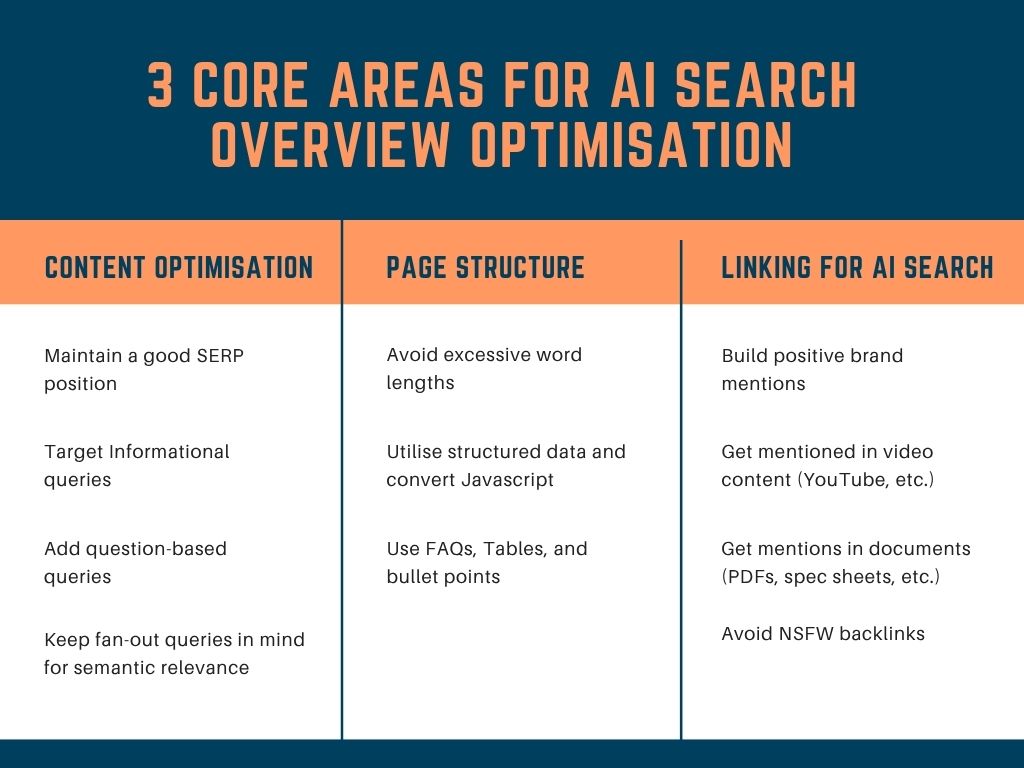
There are 3 main areas where you can most effectively improve your chances of ranking in AI overviews:
- Content optimisation: How to optimise the actual text, images, and other elements that comprise your content for LLM readability
- Format & page structure: The technical elements, like schema, structured data, and components, that can be put on the page in the context of best practices for AI
- External linking: The impact of mentions, links, and content from other sites on search overviews
Content Optimisation Tips
Here’s how you can optimise content for Google AI overviews:
- Maintaining a good SERP position: Traditional SEO methods are not going out of style because ranking high on the SERP is still the best way to end up in an overview. All the classic SEO metrics on SEMRush or other tools still apply.
- Informational queries: Informational queries perform very well and get picked up a lot. AI answers tend to crop up more frequently here (by over 90%) than on navigational or commercial queries. However, you can also use keywords with informational search intent to lead to commercial pages. For example, “How much do marketing services cost in New York?” can be a good informational keyword to add to a lead-gen page.
- Questions are king: Questions are much more likely to be picked up by AI overviews, especially ones with natural sentence structure. According to Ahrefs, questions show up in more than half of AI search outputs. Using SEO software like Ahrefs or SEMRush can help you find the keyphrases and questions to structure your content around. Similarly, instructive keyphrases like “how tos” and “where-to-find” questions can be helpful as well.
- Fan-out queries: During its reasoning process, AI will examine a lot of related phrases that are semantically tied to the original query. For example, if you search for “Best Cadbury chocolates for diabetics”, it is a question AI probably doesn’t have a direct answer for, so it breaks it up into related ones. It will look for “cadbury chocolate sugar content”, “amount of sugar diabetics can consume”, “health tips for diabetics”, and so much more to collate an effective answer. This is called a fan-out query, which can be handy in giving you an entry on SERP for a semi-related topic. If you optimise for a certain topic, you can get these queries by being an authority to reference when necessary.
How to Structure Content For Google AI Overviews Feature
AI-generated answers pop up at the top of any search queries you enter into Google, giving them an instant first place. Similar to SEO, you can procure an AI answer by creating content that matches queries, but you also need to make some specific structural considerations.
Generative AI is very responsive to certain website structural elements. This content performs better when it contains:
- Avoid excessive word lengths: AI tends to read snappy, bite-sized content. This is sometimes a product of its limited context window or due to unclear, loaded language that can be hard for an LLM to parse. Either way, keeping things clean and simple is the best way to write for LLMs to pick up. The average content length, as measured by Ahrefs, was 1282.
- Utilise structured data: AI cross-references structured data and schema markup as a sign of confidence in a webpage. It helps search engines derive information and see how a page connects to other verified entities. Structured data also minimises hallucinations and contextualises the page within a proper category. Therefore, use the right schema where appropriate, including contact pages, FAQs, news articles, organisations, recipes, locations, etc. Tools like prerender.io show AI crawlers a ready-made HTML version of your page, which can be handy since they can’t read JavaScript well.
- Use FAQs, Tables, and bullet points: Certain structural elements perform better for LLMs. These include question queries (as mentioned earlier), tables, and bullet points. These can maximise your chances of getting picked up by an AI overview and LLMs in general. You can also optimise your chances by labelling your tables and adding meta descriptions.
Linking For AI Search
Citing sources and getting cited also helps. External links are a bigger part of SEO strategy since AI tends to favour them heavily.
- Build positive brand mentions: Brand mentions within various lists, business directories, online stores, and review sites all add up. These can signal to the AI search engine that you are worth picking up and being featured.
- YouTube mentions: Don’t just focus on text websites and blogs. YouTube and other video-hosting sites offer a lot of incentives. Even within videos, you can add descriptions, metadata, chapter titles (at least on YouTube), and other signifiers for it to read.
- Document mentions: AI can read PDFs, which means there are now other different avenues you can aim for. Technical documentation, studies, spec sheets, and other official-looking documents give signals to the overview algorithm.
- Avoid NSFW backlinks: Getting linked by sites deemed inappropriate for mass consumption will get your website deranked in mentions. AI companies have been skiddish about the potential for their outputs to show NSFW material, so they are bullish against adult content. Keep your links PG.
AI Overview Trackers
Google and AI overview trackers are a must in this new era. According to our research, these are the best tools for monitoring AI overviews:
- SEMRush: SEMRush also features one of the best AI overview trackers. It allows for daily keyword monitoring, showcasing query triggers for AI Overviews with citation tracking. The domain Overview monitors total mentions, cited pages, and keywords where you rank within AI Overviews SERP Features. The filter isolates AI Overview rankings from traditional organic positions with toggle comparison. SEMRush operates at $99/mo with the option for add-ons.
- Ahrefs: AI overview tracking with Ahrefs has gotten fairly advanced. Much like SEMRush, Ahrefs shows Google AI Overview tracking, mentions, citations, impressions, and AI Share of Voice Competitor benchmarking. The site explorer AI citations module is quite handy. Where it lacks features is in giving actionable feedback. Another downside of Ahrefs is the pricing, with the individual platforms being $199 per month per index, while the AI platforms are $699 per month.
- Omnia: As AI overview tracking tools go, Omnia is a recent one that is dedicated specifically to LLM features. The Google AI Overview features monitoring with 24-hour refresh cycles across ChatGPT, Perplexity, and Google AI Mode. It boasts GEO-first monitoring with unlimited localised tracking (country-specific citation patterns). It provides task lists with content briefs that can optimise your publishing and provide you with informed insights you can use to improve your pages. Omnia is priced at $79 per month to $279 per month, with a custom enterprise option.
- Moz: The Keyword Explorer shows your AI Overview presence. The expandable summaries, cited titles, and URLs for each keyword make this a handy tool. Position Tracking helps with flagging AI Overviews and other AI SERP features, also offering historical presence and share-of-voice tracking. The STAT Search Analytics for enterprise offers audience segmentation by market, intent, device, and competitor groups. On a starter level, Moz is $49 per month, standard prices are $99 per month, and large enterprise models are $299 per month.
AI overview and rank tracking is still an emerging field, which is why many of these software have vastly different approaches. While they track AI overviews, other features can vary.
Can You Turn Off AI Overview on Google?
Yes, you can turn off AI overview and automatic snippets. Here’s how to get rid of AI overview on PC:
- Install an extension: To hide Google AI overviews, extensions such as Hide Google AI Overviews are available. You can add it to your browser, and it will do its thing. It works best on Chrome-based browsers, but there is a separate extension for Firefox.
- Manual search engine tweak: You can also hide the AI overview yourself manually by modifying the default search URL. Open Chrome and find the settings in: chrome://settings/searchEngine. Another way is to go to Chrome Settings > Search Engine. Scroll to Site Search and click Add. Enter the name as AI-Free Google, the Shortcut as “@web”, and the URL as “{google:baseURL}search?q=%s&udm=14”. Then you can make this the default.
For mobile users, there are a few other ways to disable AI search:
- Chrome: First, open Chrome and visit tenbluelinks.org. Then, open a new tab and search for anything on Google. You can then tap on the three-dot menu in the bottom right corner (Top right corner on Android). Choose Settings in the pop-up. In Settings, select the Search Engine option and select Google Web in the Recently visited section. Finally, you can tap Done and set Google Web as the default search engine.
- Firefox: Open the Firefox app and tap the three–dot menu in the top right corner to go to Settings. Add a Search Engine and add it as AI-Free Google. In the URL field, you can paste: “https://www.google.com/search?udm=14&q=%s” and then tap Save.
You may need to know how to remove AI from Google search for a variety of reasons:
- It can be useful to see results without AI.
- AI can provide bad information.
- Many users shut off the AI overview, which can alter the SERP. You may need to monitor it with AI off.
Reconfiguring your content strategy to adjust for AI overviews can seem complicated. However, if you want guidance on content production, strategy, and planning, our marketing services might come in handy.