


Website Structure SEO: Structural Tips For Digital Marketing
A properly structured website isn’t just an improvement for UX and ease of navigation. It also helps search engines understand how to rank pages. As a field of search optimisation, it requires foresight and planning. Let’s look at how you can build an SEO-friendly website structure.
How to Plan Website Structure
When you structure a website, you need to create a proper plan that encompasses the purpose of the site, your target audience, and a structural map. Let’s break these down into the most essential steps for how to structure a website:
Choose a Hosting Provider
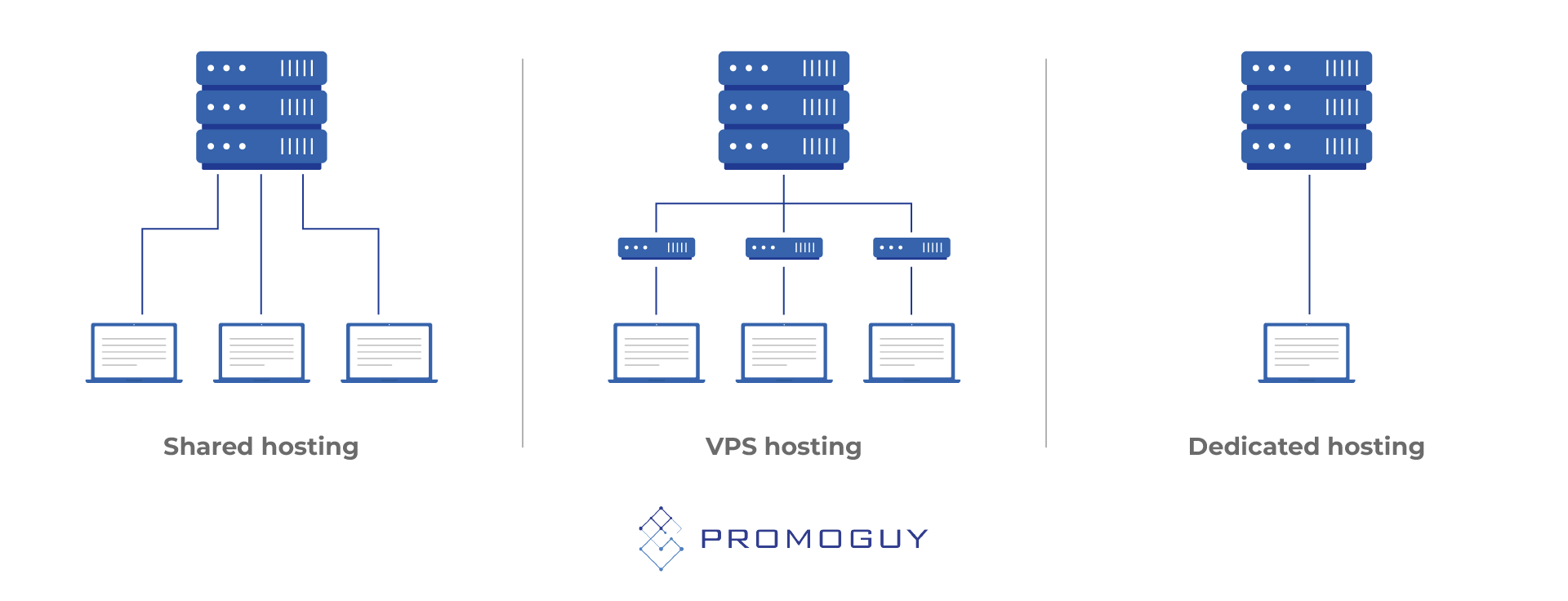
Choosing a hosting provider is a matter of costs and accessibility. There are 4 main types of hosting:
- Shared
- VPS
- Dedicated
- Cloud
Shared hosting is the most affordable and straightforward. Your site’s server space will be linked with others, which makes it great for personal sites and small business webpages. However, this is better for companies that are just starting out, and don’t have massive online operations. You may later need to switch to a VPS (Virtual Private Server) or cloud web hosting, which offers better control and speeds. They are better at handling traffic spikes and are more customisable.
The type of hosting can influence several factors:
- Website speed: Speeds are critical to good SEO, as slower websites will get deranked and have worse UX.
- Customer support infrastructure: Better customer support carries better functionality for too long. Certain providers often offer all-day support with a live chat or phone support.
- Hosting package benefits: There are many free domains, with one-click WordPress installation, free SSL certificates, daily backups, and built-in email hosting. These can cut your work in half and allow for easier operations.
- Costs: Aside from hosting rates, some website builders come with website hosting packages, which can save on costs. The main compromise is less extensive control and customisation options, so weigh out the costs and benefits in advance.
Define Your Target Audience
Understanding who will be reading your website and what they will get out of it is vital. Thus, plan things with the end user in mind. One way of doing this is with demographic research or even a buyer persona to help get a grasp of your ideal viewership. That said, there are some inferences one can make. If you have an established audience, a quick survey can also be helpful. Blogs, Reddit threads, and the various platforms they use can all provide ample ideas for design and user preferences.
Audience preferences can be essential. They can also help you decide on website elements and component questions, such as:
- Should you include a personal blog?
- Where should the email signup form go?
- What is the right number of pages?
- What type of content will work best?
A site aimed primarily at mobile users should be especially fast-loading, mobile-friendly, and simple to navigate. Mobile users have a far higher bounce rate, so this can be an important consideration. Similarly, a more technical desktop-heavy readership looking for in-depth reading will require extensive resources, which can mean loading the website with diagrams, images, documentation, etc.
Some aspects have established best practices that work regardless of audience type or composition. Clear fonts, good contrast, and a mobile-responsive design are essential.
Settle on a Website Structure
Now it’s time to create a roadmap. Drawing it out on Figma is a great way to get started.
Key pages include:
- Home
- About
- Contact
- Services or products
- Blog, news, or other resources
With these base components, you can subdivide them into smaller subpages. You can divide up the services into distinct sections, such as marketing services or website design or SEO, if you’re a marketing company. Develop it like a tree diagram, starting with the homepage and branching out to other sections and branches as it expands to other subpages. This will form your sitemap, which can define your user flow and user experience (UX).
This isn’t just great for the user, it’s also handy for Google and other search engines. Better formatting helps crawlability. The way your breadcrumbs, URLs, and slugs are organised can be handy, as it is also treated as information and even as SEO keywords. Conversely, a poor structure will hinder website indexing. Here’s what to look out for:
- Be consistent when naming your pages and navigational elements
- Align the header and footer links to H1s
- Ensure that the content under these labels aligns with their intent (contact forms in the contact page, etc.)
- Minimise clicks to find elements (you can employ dropbars and search bars)
- Sticky menus can help for small sites
- Single-page design is also handy if your sight does not require a lot of content
Select Your Website Builder & Visual Assets
Website builders like Wix and Squarespace can be an option if you don’t have expertise or manpower. However, these can severely limit the degree of control you have over functionality and appearance. Going with WordPress is often the wisest longterm choice as it can offer the least amount of headaches. Similarly, eCommerce websites can benefit from Shopify features. This comes back to the target audience for your website and what features they expect.
Many builders come with free plans, which are great for testing. However, you may eventually require paid plans for custom domains, analytics, or e-commerce capabilities. Work with the budget you can and scale up to what you will eventually need. Keep in mind how quickly you will need to grow or change and whether the plan you’re aiming for can help you stay on track.
The website builder can also limit your choice of visual assets. Visual assets are key to branding, so it’s important to make them unique and recognisable. In terms of visual assets, here are a few rules of thumb:
- Keep your colour palette to 2 or 3 colours, a background and accent colour, with some leeway for shades.
- Keep the visual identity accessible and avoid using light text on light backgrounds or colour combinations that are difficult to read
- You shouldn’t switch fonts too often, but you can have one font for headlines and another for body text
- Build a standard, easy-to-read style that users can parse easily, especially for critical deals, offers, and pricing
- Visual identity should align and use similar colours, styles and backgrounds
Create Or Curate Your Content
Not all sites are primarily content-based, but all sites have content. This vague term can mean a lot of things nowadays, so let’s break it down. You need to decide what pages you need, like a “Services” section, FAQs, team bios, or a pricing guide. Make sure you know the purpose of each page and what it adds. Then you can start deciding what content should be on it.
Originality is a crucial factor for search engines as well as readers. Write in your own voice and draw from the best-performing content in your field to improve on it. Visuals and images are also a great spot for SEO improvements. They make blog posts more readable and add places to put some metadata and alt tags.
Update with frequency and consistency. You can keep a calendar and make sure you have a range of topics to cover with it. Content shows expertise within your field, helps people find your website through search, and helps you showcase your personality.
Plan SEO Structure
Create a definitive list of what topics your site touches on and research the terms people use to search for them. Tools like SEMrush and Ahrefs can be the best guides for this. Add the terms you’re using to the pages on your site as you go along. Keep adding the keywords across your site and making sure they are spread out. Here are some key elements to include:
- Page titles
- headings meta descriptions
- Images
- Text body
- URLs
- Breadcrumbs
- Slugs
- FAQs
- Hyperlinks (internal and external)
Focus on readability and add clear page titles, concise URLs, internal links, etc. Employ clear file names and describe the images you use. Ensure fast load times, implement a design that takes multiple devices into account, and maintain clean code.
Website Structure Types
There are 4 main website structure types:
- Hierarchical
- Sequential
- Matrix
- Database
Hierarchical Structure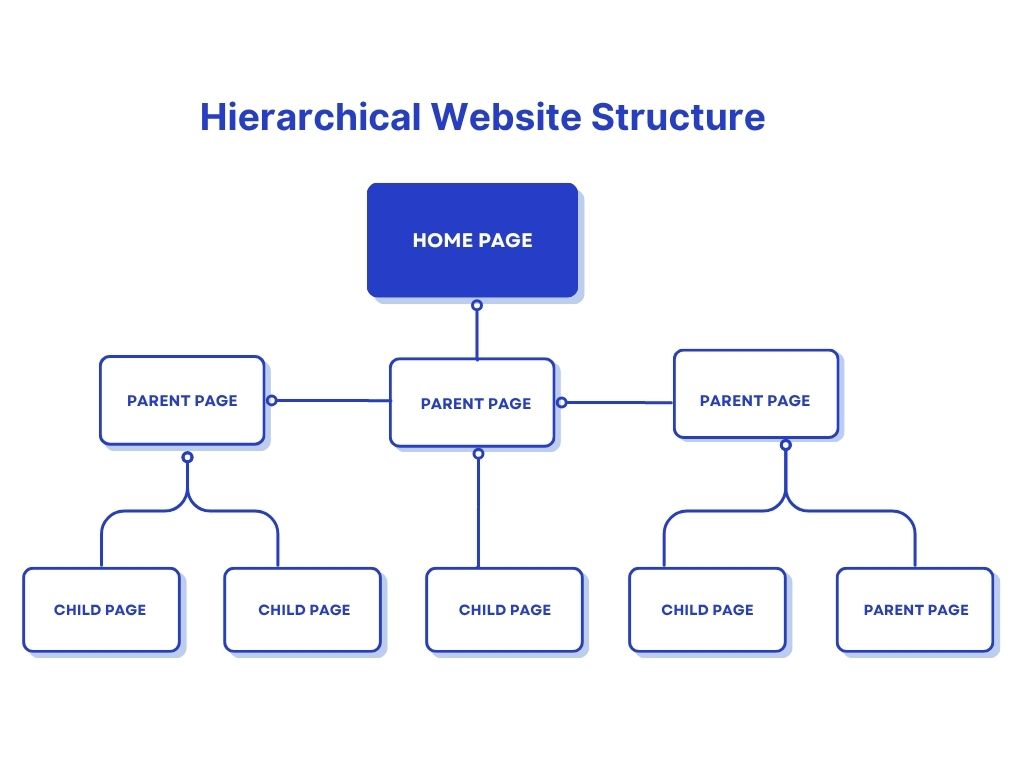
A hierarchical website structure, aka tree model or website tree structure, is the most common one. It starts with a home page, some top-level category pages, and then the subpages or child pages. Each forms a lower successive layer, growing with internal linking contextually connecting all the pages.
This top-down format for a website structure is typically found in use on all sorts of sites, from simple portfolios to company pages. Its simplicity is the reason for its ubiquity in website design. All the web pages are nested within bigger ones, creating a logical flow for navigation and UX.
Sequential structure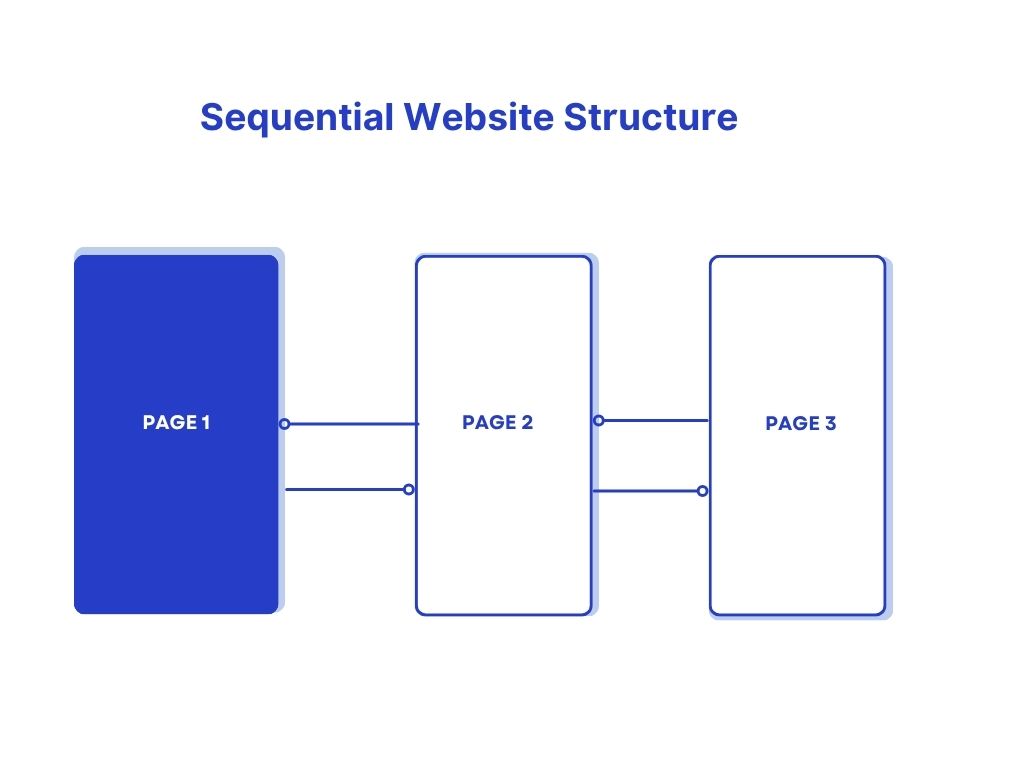
Sequential or linear structures set up a site step-by-step with successive pages that link back and forth from each other. It runs like a vehicle on a rail, with forward or backward movements. A survey page is the best example of this, but it can also be seen in checkout pages for eCommerce websites (even though the whole page might not be linear, that one aspect usually is).
The advantages of sequential structures include being easy to design and the degree of control they provide over user navigation. This is a straightforward design with a functional process. Easier planning makes it a favourite for functional pages like sign-ups and purchase pages. This makes it a good addition to other structures when you need to make a purchase or sign up for a newsletter.
Matrix structure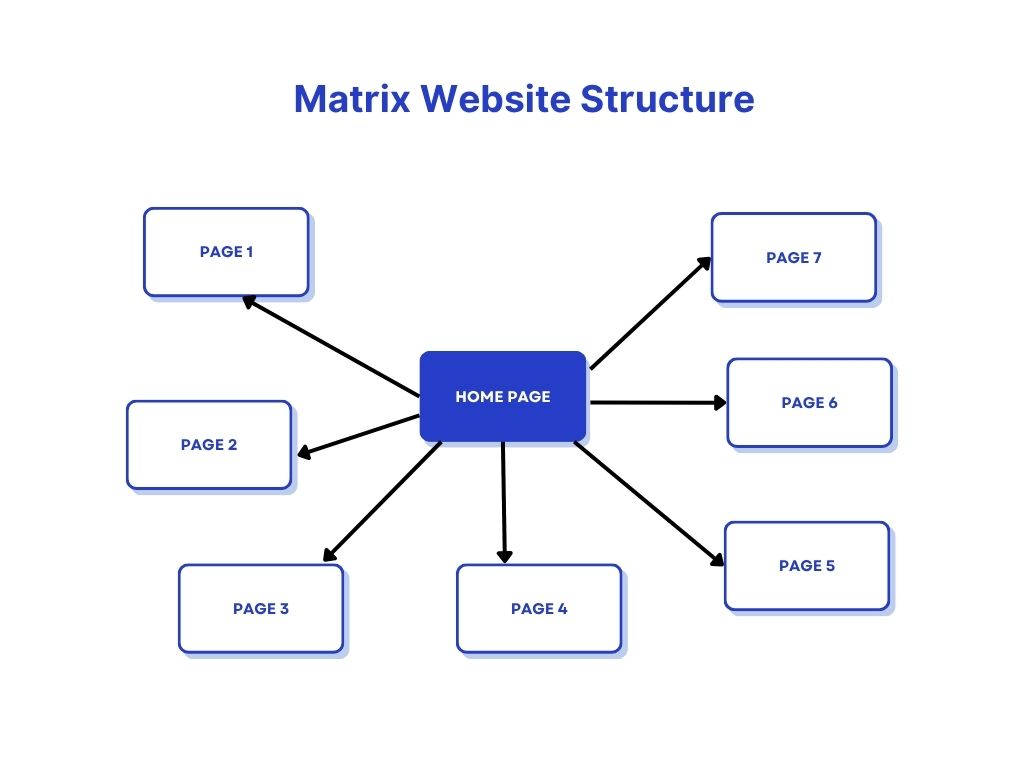
The matrix structure works as a network of pages that runs without a directional flow. It’s also known as a webbed website structure. It makes it easy for users to utilise the website as it suits their needs, with total freedom to browse. This is best for large sites with a lot of loosely connected pages. Many eCommerce sites, like eBay or news websites, will use a matrix structure.
It still utilises basic parent pages and child pages. However, users can find them in whatever order they please. Thorough internal linking ensures they can find what they’re looking for in as few clicks as possible.
Database Structure
Often called a dynamic website structure, databases are highly customizable as they ustilise a massive number of links within one site. This can be more search functionality-based and amenable to user-defined paths for navigation. In this sense they can take on many different shapes depending on what kind of content they serve.
Think about something like Reddit, where you have many sub-domains (sub-reddits), a personal profile, personalised messaging, and other user profiles. Because of the abundance of content, there needs to be a search bar, categories, and other such functions. A user defines their own feed to personalise the website. Other examples of this are online forums, news sites, social media platforms, user-generated content hubs, and massive e-commerce platforms. With a large quantity of products and categories, businesses often opt for a database website structure.
While it is complex to set up and maintain, the easier navigation can be worth it. The ability for users to customise their path can be especially handy for increasing engagement and providing better UX. Choosing between the types of website structure is often about scale and scope, so databases match the needs of larger business operations.
Website Architecture SEO
Website architecture is basically the layout of the website and its layers. Building a good website architecture for SEO performance can be fairly simple in theory, but complications can arise in practice.
Flat website architecture makes it easier for users and search engine crawlers to reach any page on your site with ease. In most ordinary cases, that would be about 4 clicks or fewer. Obviously, this varies by the type of site you are going for, but as a rule of thumb, it works for most non-eCommerce business websites.
Aside from simplicity, a flat and shallow SEO architecture provides better link authority. It also means that Google spiders can find all of the webpages on your site. Establishing a website hierarchy early on can be a major boon as your site grows. Most sites with a complicated architecture start with one right off the bat. Chances are that random categories popped up along the way, and the subdomains and pages got out of control.
If your page is likely to expand to 1000’s of pages, you need to use categories and a database structure. If not, it won’t be a necessity and should be avoided as simpler structures are easier for Google to crawl. Categorisation can be especially handy for large eCommerce sites or social media. They can be turned into easy navigation tools like those you might see on the IKEA website or other major retailers.
This ensures a website navigation structure that is easy to use while knowing where you are at all times.
Best URL Structure For SEO
Getting more granular, there are some best practices for making your URL structures far neater. Properly structuring a website requires a good URL structure. This ensures that website content structure properly adheres to clear URLs with subpages that flow properly within the hierarchy.
| Recommended | Not recommended |
|---|---|
Using an equal sign (=) to separate key-value pairs and an ampersand (&) to add additional parameters:
https://example.com/category?category=dresses&sort=low-to-high&sid=789 |
Using a colon (:) to separate key-value pairs and brackets ([ ]) to add additional parameters:
https://example.com/category?[category:dresses][sort:price-low-to-high][sid:789] |
Using a comma (,) to list multiple values for the same key, an equal sign (=) to separate key-value pairs, and an ampersand (&) to add additional parameters:
https://example.com/category?category=dresses&color=purple,pink,salmon&sort=low-to-high&sid=789 |
Using a single comma (,) to separate key-value pairs and double commas (,) to add additional parameters:
https://example.com/category?category,dresses,,sort,lowtohigh,,sid,789 |
| Clean structure:
https://example.com/wiki/Promoguy |
Messy Structure:
https://example.com/index.php?topic=42&area=3a5ebc944f41daa6f849f730f1 |
| Use hyphens (-) when separating words:https://example.com/marketing-services/search-engine-optimisation | Using underscores (_) to separate words:
https://example.com/dark_jackets/filter?color_profile=dark_grey |
Website Structure Analysis Tools
You can view website architecture in various SEO tools:
- Mysitemapgenerator.com: A great online tool for anyone wondering how to see website structures. This can produce a sitemap after crawling your website, producing an accurate layout for any website whose URL you enter. You can get the XML file directly from the site, although it takes a while to crawl.
- Figma: Figma can help create sitemaps and lay out a website before development. Laying out a proper flow and mapping the UX is a great means of optimising UX.
- LinkBoss: It can help you develop a website structure audit report. It creates a map of the various topic clusters and their prevalence, which can be great for SEO and UX.
- SEMrush/Ahrefs: SEO analysis tools can help you analyse URL structure, number of pages, breadcrumbs, and most other elements of website structure.
If you’re optimising your website architecture for seo, you need to know what you’re doing, otherwise it can damage your CRO. That’s why it’s best to let professionals handle it. Check out our marketing services page to learn what we can do for you.